
NOTE: The tester will take a few moments to respond when powered up for the first time.
WiFi Settings
Set up the tool’s WiFi connection.
Automatic: The tester searches for any detectable WiFi networks. Select a displayed network on the tester screen.
Manual: Manually enter your network’s Security, SSID, and Password information.
User Credentials
Enter the Username and Password.
Use

to highlight the characters on the displayed keyboard;
and press

to select.
Dealer Code
Use
to highlight the characters on the displayed keyboard;
and press
to select.
Shop Info
Use to enter information about the shop in which the tester will be used.
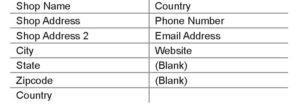
1. Delete the placeholder text.
2. With the displayed alphanumeric keypad, use
to highlight the desired alphanumeric character. Select
 to access the lower case and symbol character maps.
3. Once all of the alphanumeric characters have been entered, select Save or Esc to exit without saving.
Data Collection Consent
Select Accept to Consent to Collection and Use of Test Data.
The Main Menu is then displayed.